Productivity Systems That Actually Work in 2026
Published: August 28, 2026 Last Updated: September 3, 2026 The truth is, for most folks it’s not a productivity
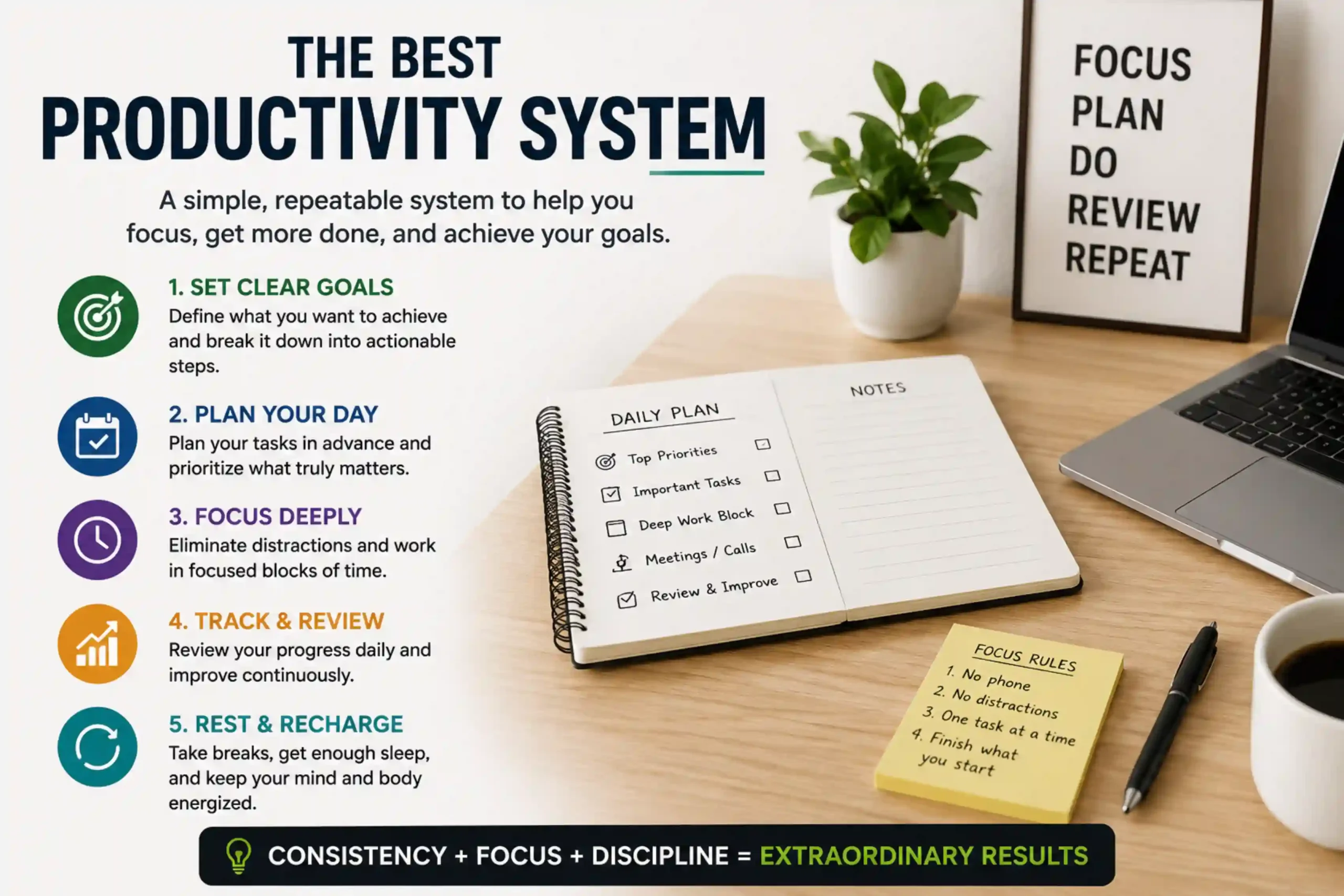
The truth is, for most folks it’s not a productivity problem… it’s a systems issue. You can be diligent, committed, determined, and still get behind simply because you’re operating on a workflow that just isn’t compatible with your brain’s natural tendencies. This masterclass investigates the true contenders for the best productivity system of 2026 – such as the GTD workflow, time blocking, and the second brain approach along with the connection between deep work routines and the right tech tools.
The idea isn‘t to try all of them immediately, but to know each well enough to select or adapt what is really going to help your work.
Why “One Best System” Is the Wrong Question
The common thread I noticed between every popular productivity method was that they were designed to solve a single problem: GTD is designed to empty your head. Time blocking is designed to prevent distraction and reactive planning. Second brain is designed to prevent info overload. They weren‘t designed as one size fits all solutions.
The more important question is not so much “which system is better,” but more like “what is the actual problem I‘m trying to address at the moment?”
The GTD Method: Best for Mental Clutter and Overwhelm
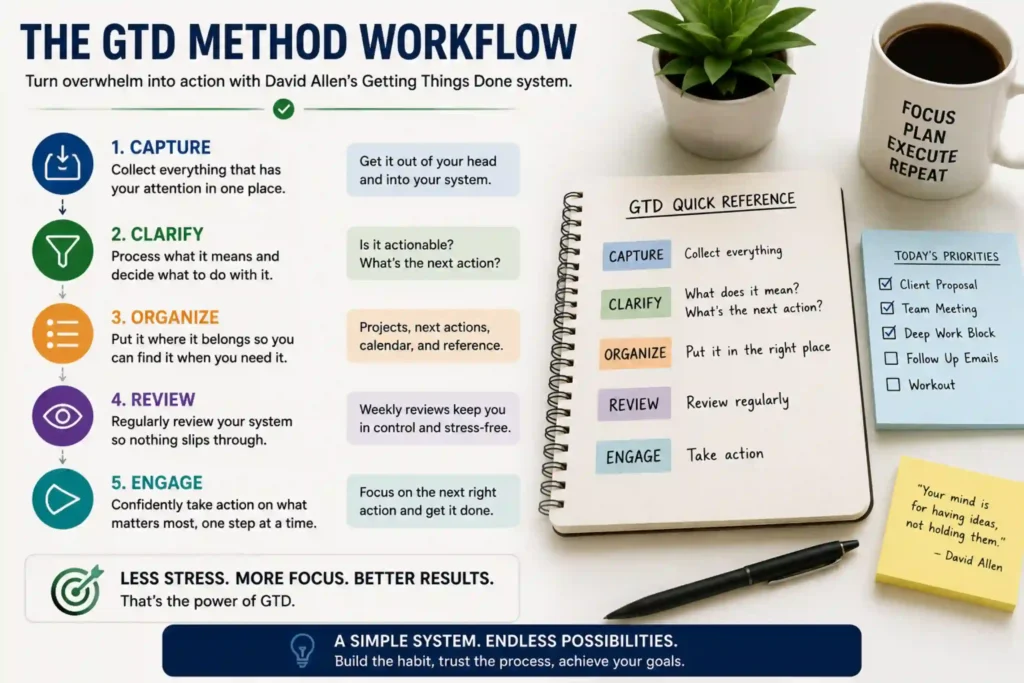
The GTD method (Getting Things Done, by David Allen) revolves around one central principle: your brain is for having ideas, not holding them. If you find yourself feeling exhausted trying to keep it all in your head, then GTD is probably the best place to start.
The GTD workflow in five steps:
- Capture Log down all to-do‘s, ideas, or commitments the second they come into your head into one reliable place.
- Clarify determine what each identified item really represents and whether it can be acted upon.
- Organize put things in order. Set up the right systems (for example, categories and lists) for putting things in their proper places.
- Reflect if you can set aside one day a week to go back through the entire system then after a few weeks it will become familiar and you will be able to believe in and rely upon it.
- Engage selects what to work on according to context, time available, and priority.
GTD is most effective for those who have quite a few different small areas of responsibility freelancers, managers, and anyone else with a lot of projects.
Time Blocking: Best for Distraction and Reactive Days
There is a different way that time blocking productivity, in which you don’t treat one todo list but give each task a time slot on your calendar. If being dealt with based on the urgency of the situation is an issue for you, time blocking is the answer:
How to time block effectively:
- Block out your highest-priority assignment first. Wrap this up at your own energy peak.
- Batch similar activities (emails, calls, admin) rather than Spreading them over the day.
- Agreed reserving 15–20% of your time as slack, to counter overruns, interruptions, and interruptions caused by your overruns.
- Review at end of day and revise tomorrows blocks to what actually happened not what you wanted to happen.
Time blocking is most beneficial if you have a profession that is full of calendar appointments or you are someone who tends to have your day taken over by outside demands.
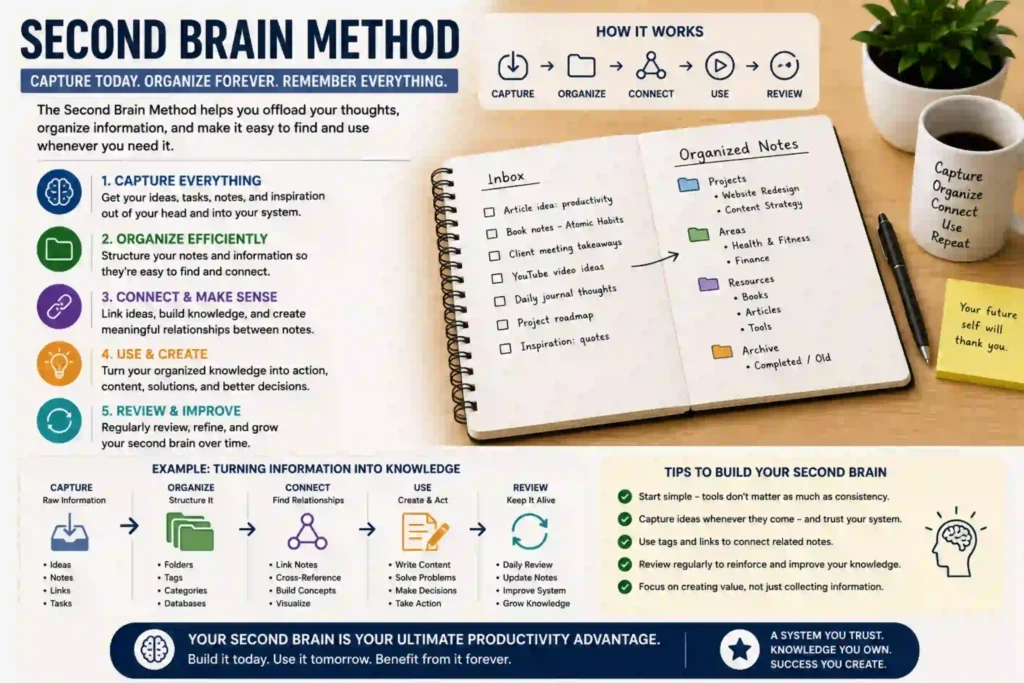
The Second Brain Method: Best for Information Overload
The second brain approach (the PARA system made famous by Tiago Fortes) is not about task management; it is a system that allows your brain to avoid holding knowledge, notes, research, thoughts or reference material.
PARA breaks everything into four categories:
- Projects work which is in operation (has recent) but has a deadline.
- Areas there are tasks and responsibilities that do not have an end date (finance, health, team).
- Resources (reference materials; topics of interest)
- Archives ones that have been inactive in the other three classes.
This works great for writers, researchers, students, and knowledge workers overwhelmed by disconnected notes, bookmarks, and half-done documents.
Deep Work Habits: The Missing Layer in Most Systems
All task systems are pointless without actually being able to focus. Deep work routines, aka long stretches of intensive concentration on hard thinking tasks without distraction, are the fundamental assumption that most productivity systems make about the learner, and almost nothing teaches explicitly.
Building deep work into your day:
- Schedule deep work in your highest-energy window don‘t settle for whatever empty room is left after receiving, commuting, and answering email.
- Begin with short (45–60 min) sessions rather than trying to cram in multi-hour blocks right away.
- During deep work, exclude any notifications il silence does not matter, include the source.
- Use a shut down ritual (close the tabs, write down the next step) to announce a clean stop.
Deep work is the execution layer. Systems like GTD, time blocking, and second brain show you what to do, deep work is the habit that actually gets you to do it.
Productivity Apps: Tools, Not Systems
You can download them all you want. The problem is, they are a system, not a replacement for a system. Picking an app first and a method second is the number one reason productivity systems don‘t last more than a few weeks.
Match the tool to the system:
- GTD: The particular Apps that works the best are the ones that allows strong Task Capture, good project grouping and contexts.
- Time blocking: Calendar apps that allow you to drop tasks into specific blocks of time.
- For second brain: strong linking and tagging between documents within outliner applications.
Pick the app after the system, not before an app picked first often gets ditched if it‘s not how you think.
Common Mistakes When Adopting a Productivity System
- Changing systems every few weeks instead of using a single system per month.
- Copying an off-the-shelf setup rather than customizing it to reflect your real workload.
- Detecting that a new app was added without ever having known to which underlying system it supports
- Treat deep work as the default and the execution layer that every system depends on
Myth vs. Fact: Productivity Systems Edition
| Myth | Fact |
|---|---|
| Productivity systems are for complex jobs only. | It helps to have some kind of external system if you are than a few balls in the air |
| More apps, more productivity. | Tool switching is often a source of more mild annoyance than the disorganization itself. |
| You only have to choose one system 9. | Most successful people merge aspects of: GTD for capturing, time blocking for doing, meditation? for clarity, reflective journaling? for reflection. |
| Deep work necessitates hours of free time. | Even 45–60 minute concentrated sessions create actual momentum over a few weeks |
Action Steps: Find Your Best Productivity System
- Recognize your real bottleneck GTD clutter, time-blocking distraction, or second-brain information overload.
- Once you have a system built, test the hell out of it for the full 2–3 week trial period before condemning it.
- Increase how much you do deep work by adding more deep work blocks per day, even if only for 45 minutes.
- Select your app only once your system is established.
- Review weekly Customize the system to whatever you work on, instead of the other way around.
There is no silver bullet productivity system just the silver bullet one for the exact problem you‘re tackling. GTD to organize a cluttered mind, time blocking to reclaim a compromised day, or a second brain when your notes have gone rogue. Submerge in true deep work discipline and have the right app follow the system, not commandeer it.
FAQs
Which productivty system is the best for beginners? If a productivity systemwere to be selected on the basis of ease of implementation, the best choice would be the Getting Things Done methodology because it first deals with the most common problem — the clutter of the mind — before introducing the complication of scheduling or knowledge-management.
Can I use GTD with time blocking and a second brain? Yes, many of the most productive people do that. They use the GTD method to record and specify items, time blocking to determine when to carry them out, and a second brain for storage of referencenotes.
How long should I live with a system before giving up? At least 2-3 weeks. Most systems are awkward in the first few days, but that‘s just because they‘re new.
Is there an app I need to follow these systems? None. All three systems can be maintained on paper. Apps just make capture, scheduling & search 10X faster once you know what your workflow is.
In what part of a productivity system does deep work belong? Think of deep work as the ‘execution layer’ the process that takes a well-organized to-do list or calendar and transforms it into finished high-quality work.
Final Conclusion
Identify the most palpable bottleneck in your workflow and select the productivity system that addresses that specific issue rather than a generic one people claim works. Experiment with Getting Things Done to clear mental clutter, time-blocking to combat distractions, or building up a second brain if you‘re overwhelmed with data, and give your selected approach a solid 2-3 week trial. Integrate authentic deep work disciplines, don‘t rush to choose your tools, and allow your system to adapt to your professional needs rather than fitting your work into an existing system.